
Nov 2026

Type the client once, print the whole file.

Opening a bank account meant filling spreadsheets and printing up to twelve forms. I built BEA Ouverture, a desktop app that asks for each detail once, checks it, and prints every form as the bank’s own spreadsheet does.

ReactTypeScriptElectronC# / .NETPythonWindows
One entryUp to 12 documents
Works onWindows 7 to 11
dossier
Client file

Real app · fictional clients

The challenge

Replace two large Excel workbooks without changing a single form, on old office PCs and with no server.

What I built

A guided form for six account types, an engine that prints the Excel sheets, print settings, statistics and Windows installers.

The result

Six account types, one entry per client, and forms that keep the bank’s layout, fonts and page breaks.

The forms could not change. Everything around them could.

A branch opened its accounts with two Excel workbooks: one for private clients, one for shops and companies. Each had an entry sheet and many sheets to print, with formulas between them.

The forms are the bank’s official documents, so they had to stay identical. I kept them exactly as they are and rebuilt the rest: a clear entry in steps, checks before printing, the print itself, and statistics for the branch.

Everything stays on the PC. There is no server, no account and no internet connection needed.

From two spreadsheets to one Windows installer.

Services performed

  • Analysis of the two workbooks
  • Desktop app (React, Electron)
  • Excel template extraction (Python)
  • Print engine and print settings
  • Light Windows version (C# / .NET)
  • Windows installers

Tech stack

ReactTypeScriptViteElectronC#.NET FrameworkWebView2PythonopenpyxlNSIS
dossier
Client file
nouveau client
Account types
saisie
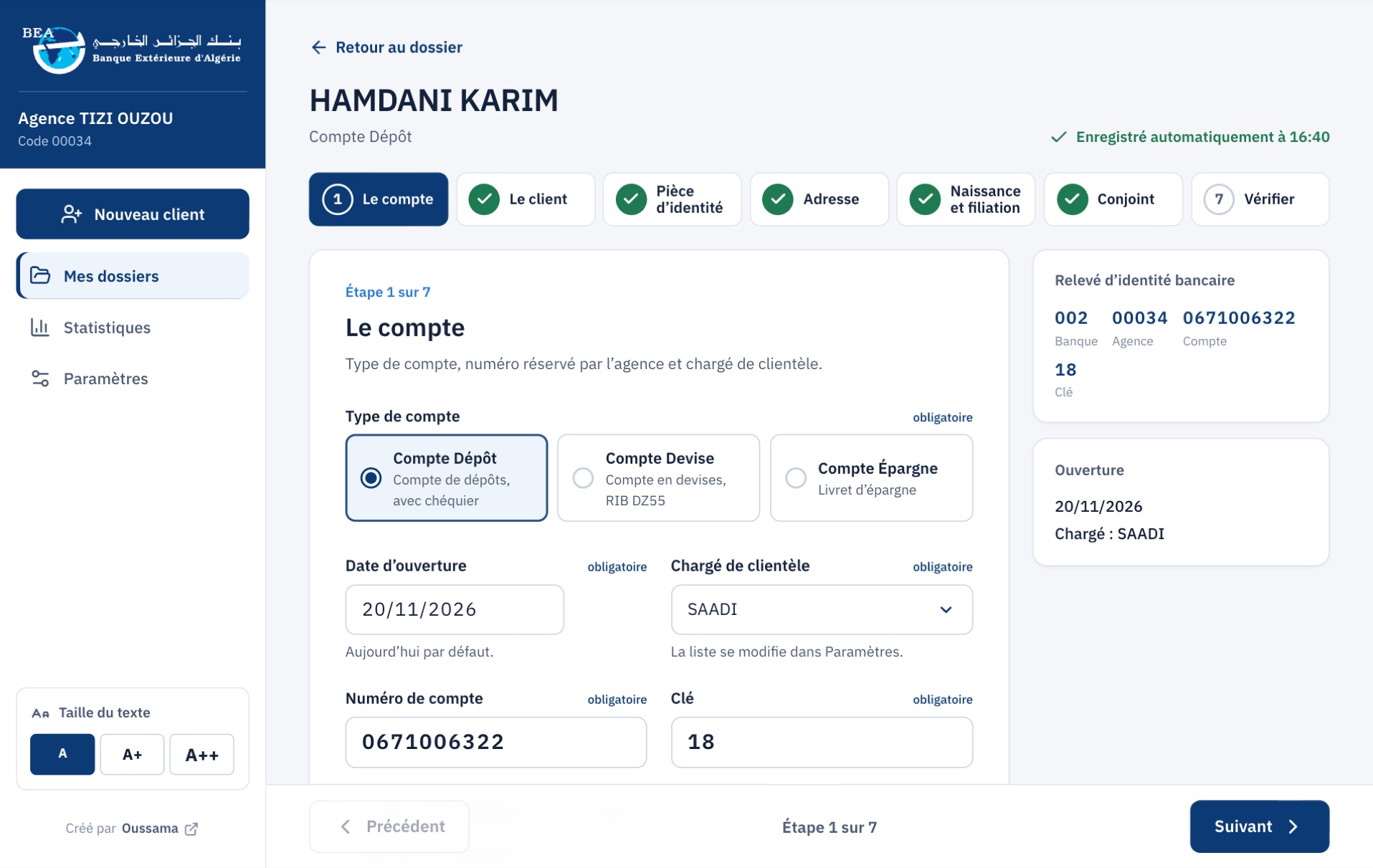
Guided entry
documents
Documents
statistiques
Statistics
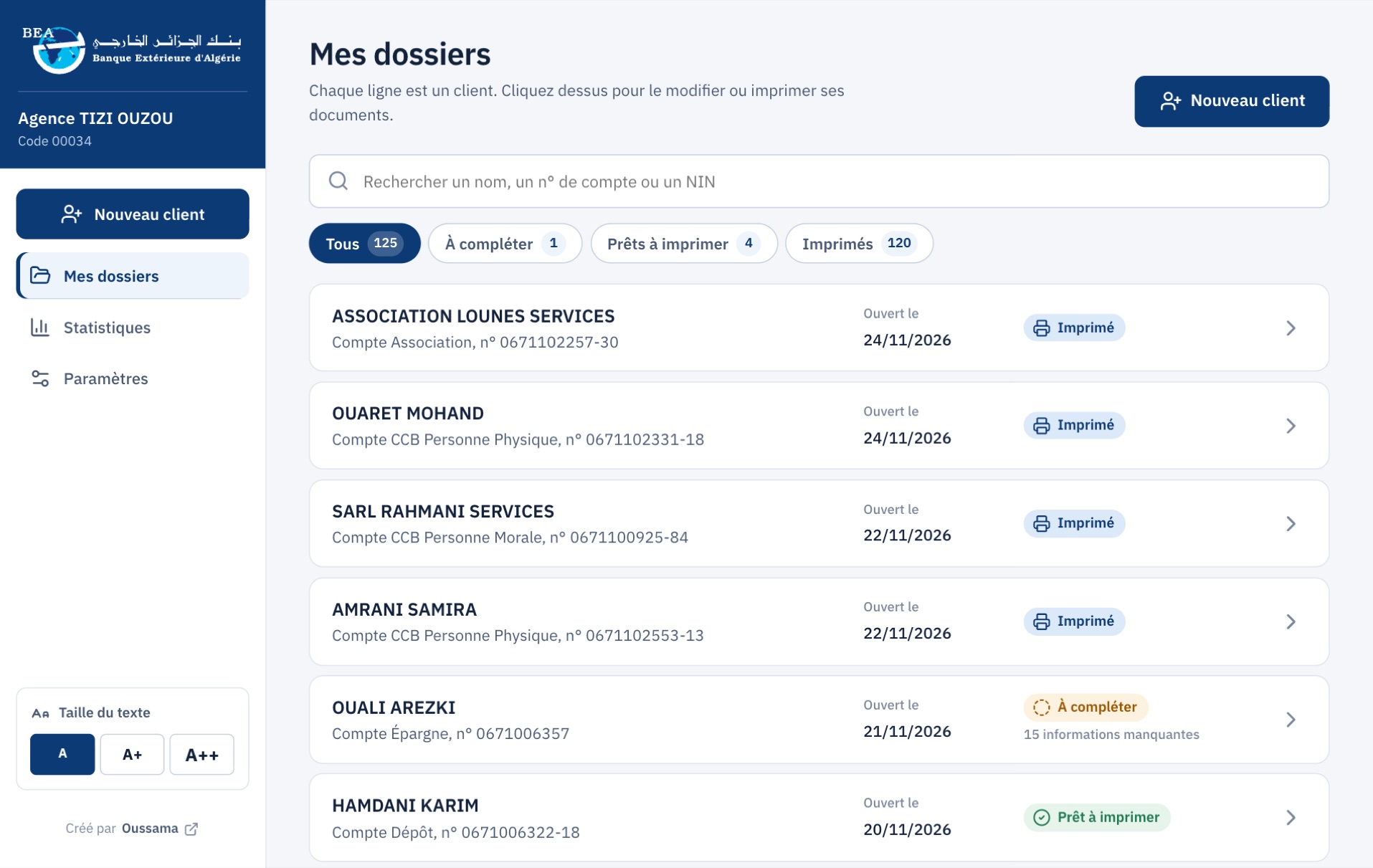
mes dossiers
Client files

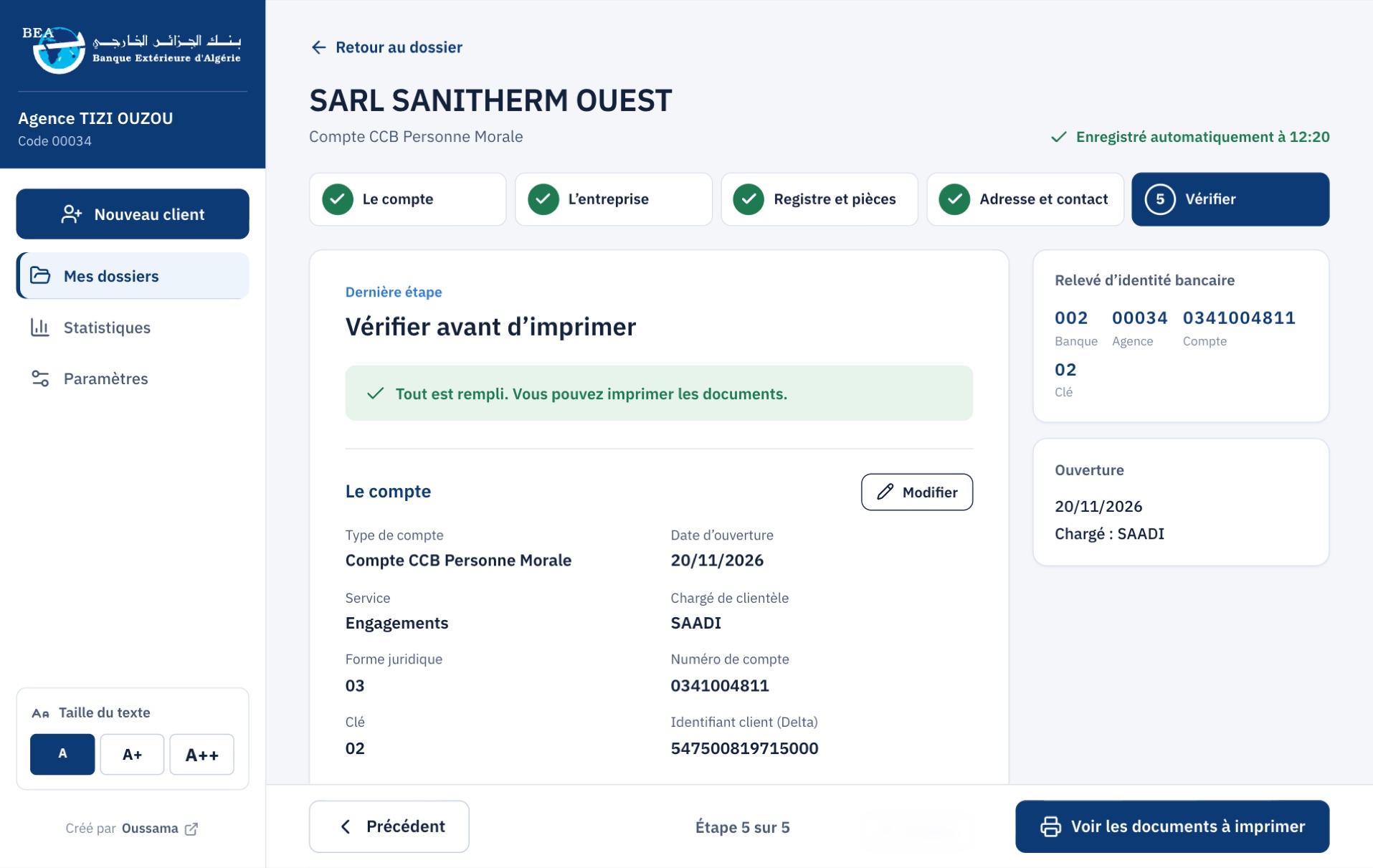
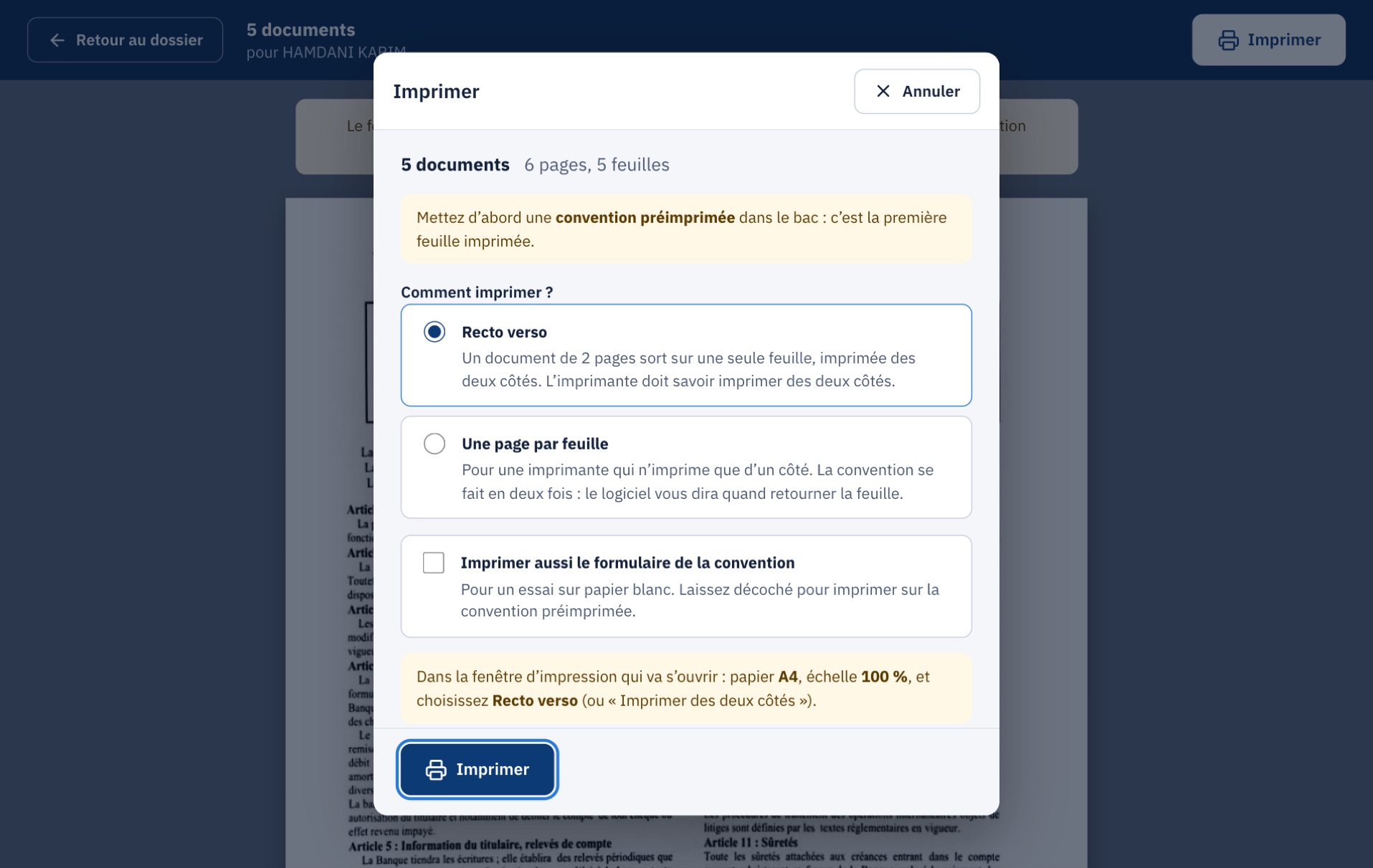
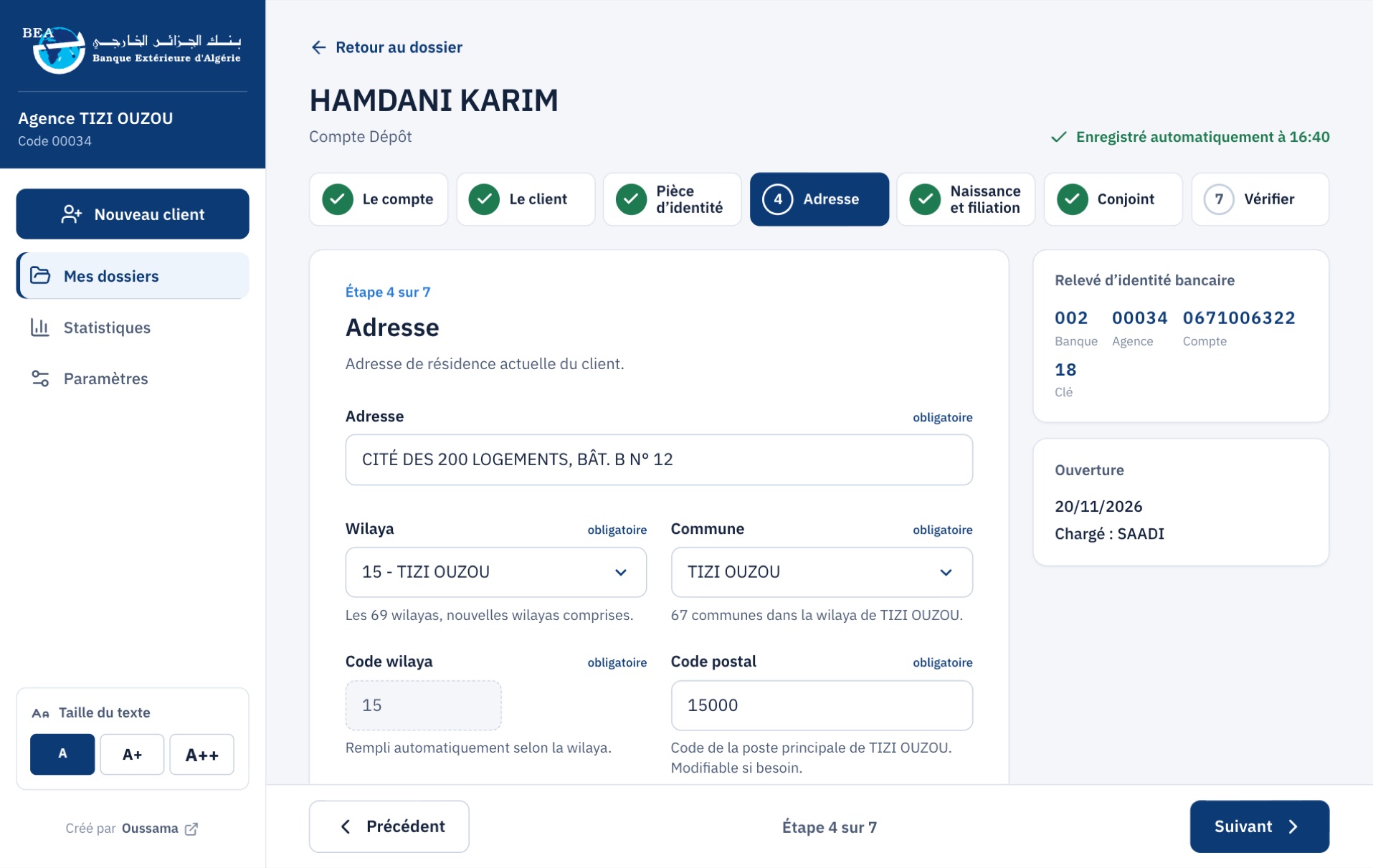
Real screens from the application, with fictional clients.

The challenge

A spreadsheet nobody dares to touch.

The workbooks worked, but with traps: values typed by hand over formulas, dates left from an old client, long numbers rounded by Excel. A mistake ended up on a signed document. And the PCs in a branch are not new: the tool had to run on Windows 7 as well as Windows 11.

01Forms identical to the originals
02Mistakes found before printing
03Old PCs, no server, no internet

Architecture

From a spreadsheet to a printed page.

The workbooks are read once, when the app is built. After that, the app needs nothing but the PC. The numbers point to the stories below.

Windows appno server, no internetBank workbooksTwo Excel filesExtractionPython · run when they changeGuided entryReact · checks at each stepForm engineExcel formulas and layoutStatisticsFilters · exportClient filesStored on the PCPrintingTwo-sided · preprinted form213654

Simplified view, based on the code.

In practice

Six problems, and how I solved them.

The problem, what I built, and what it changed.

1

Interface · guided entry

A form that follows the counter, not the spreadsheet

The problem
In the workbook, every field was on one sheet, for every type of account. An empty or wrong cell was discovered on paper.
What I built
I split the entry into five to seven steps, depending on the account, with only the fields it needs. The app saves by itself, checks numbers, dates and expired ID cards, and ends with a page that lists what is missing.
What it changed
Staff see a problem while the client is still in front of them.
  1. Choose the account
  2. Fill the steps
  3. Check
  4. Print
saisie
Guided entry
vérifier
Check before printing
2

Engine · templates

Printing Excel sheets without Excel

The problem
Redrawing thirty forms by hand would take weeks, and one line in the wrong place makes a bank form unusable.
What I built
I wrote a Python script that reads each sheet: column widths, merged cells, borders, fonts, logos, page breaks. The app draws those templates on A4 and calculates each cell from its original Excel formula, with a small formula engine I wrote for it.
What it changed
When the bank changes a workbook, the script is run again. No form is redrawn by hand.
  1. Read the workbook
  2. Template
  3. Original formulas
  4. A4 page
documents
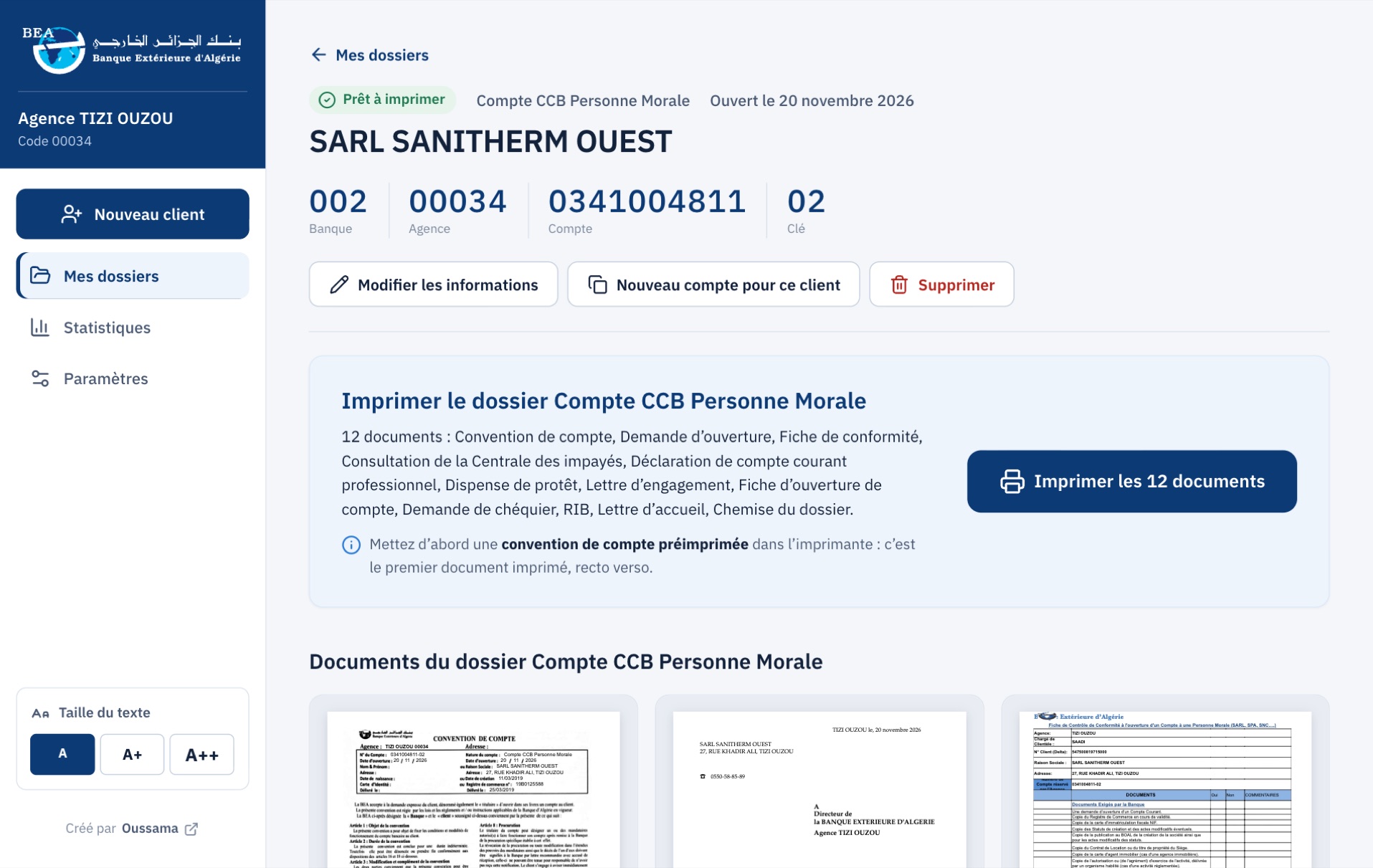
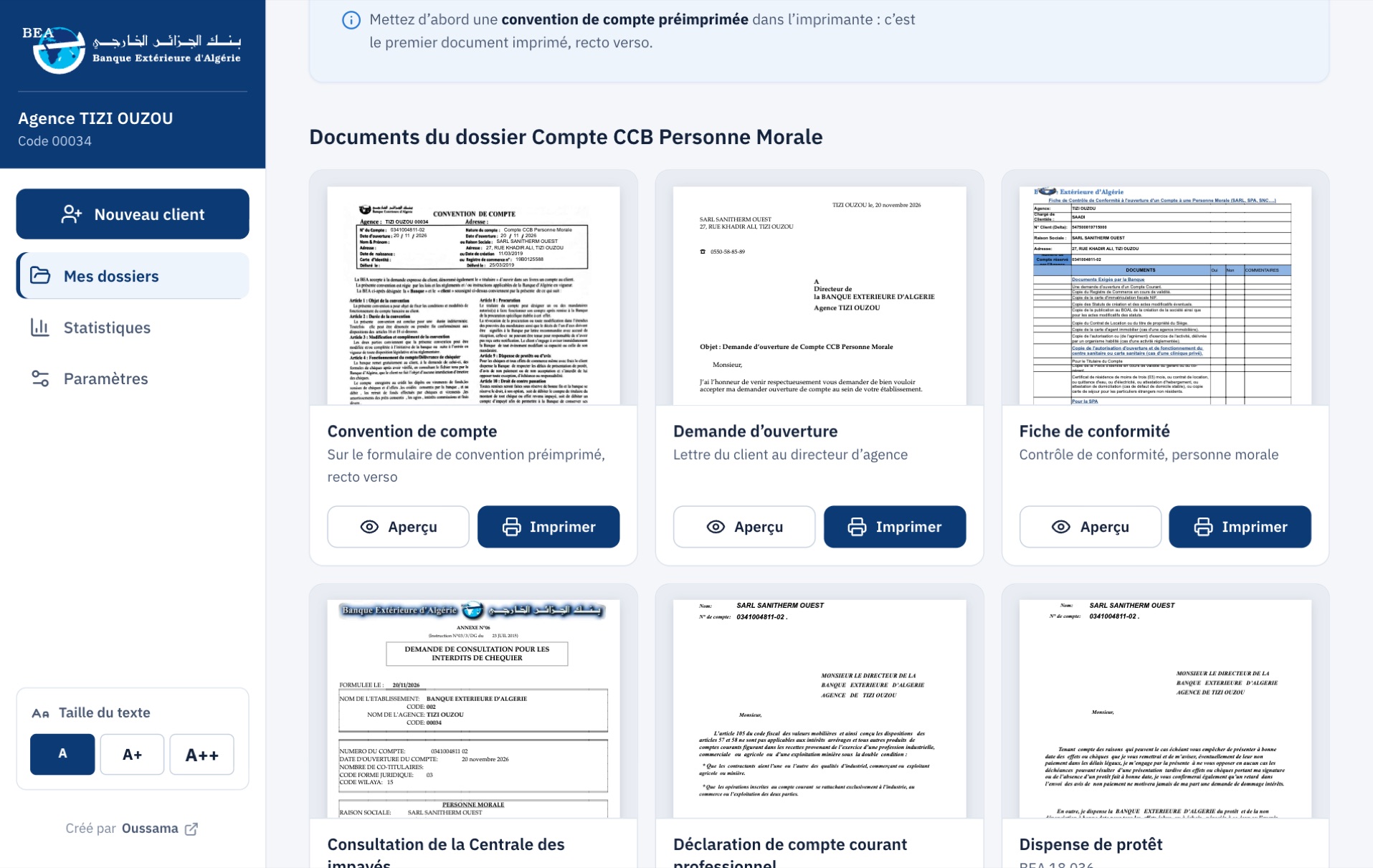
Documents of a client file
3

Quality · hidden mistakes

Finding what the spreadsheet got wrong

The problem
Copying the workbooks exactly would also copy their mistakes.
What I built
I compared every form with its formulas and listed the differences: an 18-digit ID number rounded after 15 digits, a box always set to “female”, a date typed for another client, a field that read the wrong cell. Each correction is written down, so the bank can review it.
What it changed
The forms look the same, and the values on them are right.
  1. Compare
  2. List
  3. Correct
  4. Document
dossier
A client file ready to print
4

Printing

Writing on a form that is already printed

The problem
The account agreement is a preprinted sheet, on both sides. The text has to land on its lines. And the Windows print window ignores the settings an app sends to it.
What I built
I placed each value on the form from a scan, with an adjustment of one millimetre at a time for each side. I also built the app’s own print window: printer, two-sided or one page per sheet, and clear instructions for printers without two-sided printing.
What it changed
The whole file goes out in counter order, and a blank test page avoids wasting real forms.
  1. Place the text
  2. Adjust by 1 mm
  3. Choose the printer
  4. Print in order
imprimer
Print window
5

Windows · old PCs

One app, from Windows 7 to Windows 11

The problem
Branch PCs are of different ages, users have no administrator rights, and the bank’s email refuses large files.
What I built
I built installers that need no special rights: a full version that still supports Windows 7, and a light version of about 2 MB for recent PCs, written in C# around the browser engine already in Windows. Client data stays on the PC and survives updates.
What it changed
The same screens on every PC, and a file small enough to send by email.
  1. 130 MB for all
  2. 56 MB in 32-bit
  3. 2 MB for recent PCs
  4. Same app
mes dossiers
Client files
6

Statistics

Knowing what the branch opens

The problem
With one workbook per client, nobody could count the accounts without doing it by hand.
What I built
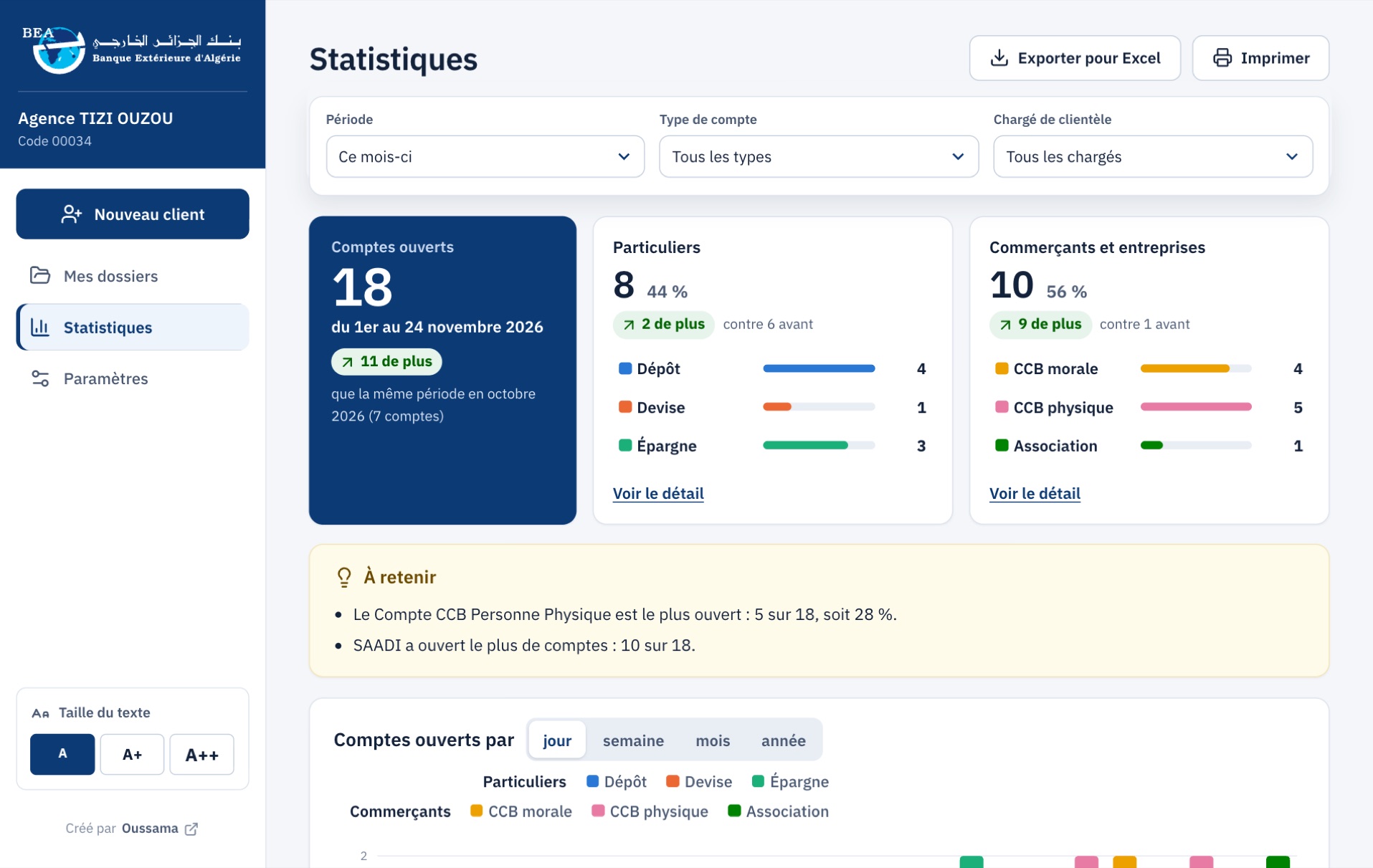
I built a statistics page with a filter row, totals by account type, a comparison with the previous period, a chart you can click, and an export for Excel.
What it changed
The numbers come from the files themselves, with nothing to enter twice.
  1. Filter
  2. Compare
  3. Open the detail
  4. Export
statistiques
Statistics
saisie · adresse
Address with towns and postal codes

Everything I built

Client files

  • Six account types
  • Five to seven steps with checks
  • 69 provinces and 1,541 towns
  • Postal code filled by itself

Printing

  • Up to 12 documents per file
  • Two-sided or one page per sheet
  • Preprinted agreement with adjustment
  • Preview of each document

Branch

  • Statistics and comparison
  • Export for Excel
  • Branch settings
  • Backup and restore

Interface

  • Three text sizes
  • Search by name or number
  • Saved automatically
  • French throughout

Windows

  • Windows 7 to 11, 32 and 64-bit
  • Light version with WebView2
  • No administrator rights
  • Updates keep the data

Tools

  • Excel template extraction
  • Formula engine
  • Number formats
  • Sample data for demos

Real screens from the application, with fictional clients.

Outcome

What I delivered

  • A desktop app that replaces two account-opening workbooks
  • Guided entry and checks for six types of account
  • A form engine that keeps the layout and formulas of the Excel sheets
  • Printing on preprinted forms, two-sided, with fine adjustment
  • Statistics with comparison and export
  • Windows installers from 2 MB, for Windows 7 to 11
Version 1.2

Where it is today

Version 1.2 was built in November 2026, with three installers: full, 32-bit and light.

What I learned

The best specification was the spreadsheet itself, including its mistakes. Reading every formula explained the work better than a list of requirements.