May 2025 – Mar 2026

Every document, on the branch’s own network.

CNL Drive gives two branches of the Caisse Nationale du Logement one place to file and find their documents, without sending them to the cloud. I built it and made it run on a Windows PC inside the building.

Next.jsReactTypeScriptPrismaPostgreSQLRBAC
Runs onThe local network
Access25 permissions
fichiers
Documents

Real app · sample documents

The challenge

File and find a branch’s documents, give each person the right access, and keep everything inside the building.

What I built

Folders, filters, keywords, uploads, users, roles and a dashboard, installed on a Windows PC that acts as the server.

The result

Every computer on the network opens it in a browser. Nothing to install, and no document leaves the branch.

From a shared folder to a searchable archive.

The Caisse Nationale du Logement is an Algerian public institution for housing finance. Its branches handle agreements, decisions, minutes and letters every day. Finding one again should not depend on the person who filed it.

I built the whole application: the database, the API, the screens, the permissions and the installation. It was delivered in phases, from the first version in May 2025 to the last corrections in March 2026, with corrections along the way.

A web application that runs like a website, on a computer the institution owns.

Services performed

  • Database and API design
  • Web app (Next.js)
  • Search and filters
  • Roles and permissions (RBAC)
  • Installation on a Windows PC

Tech stack

Next.jsReactTypeScriptTailwind CSSPrismaPostgreSQLTanStack TableZodJWTWindows scripts
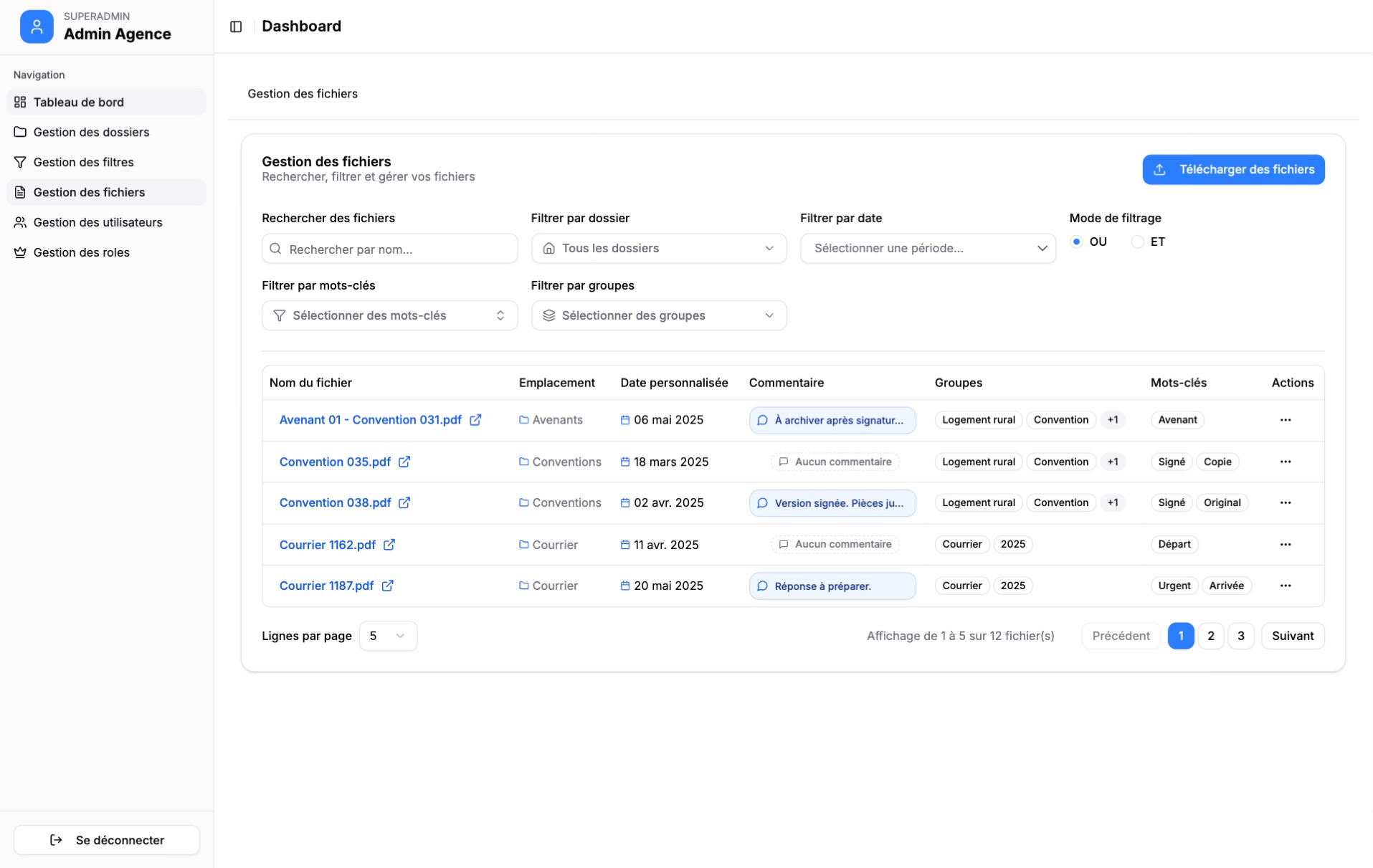
fichiers
Documents
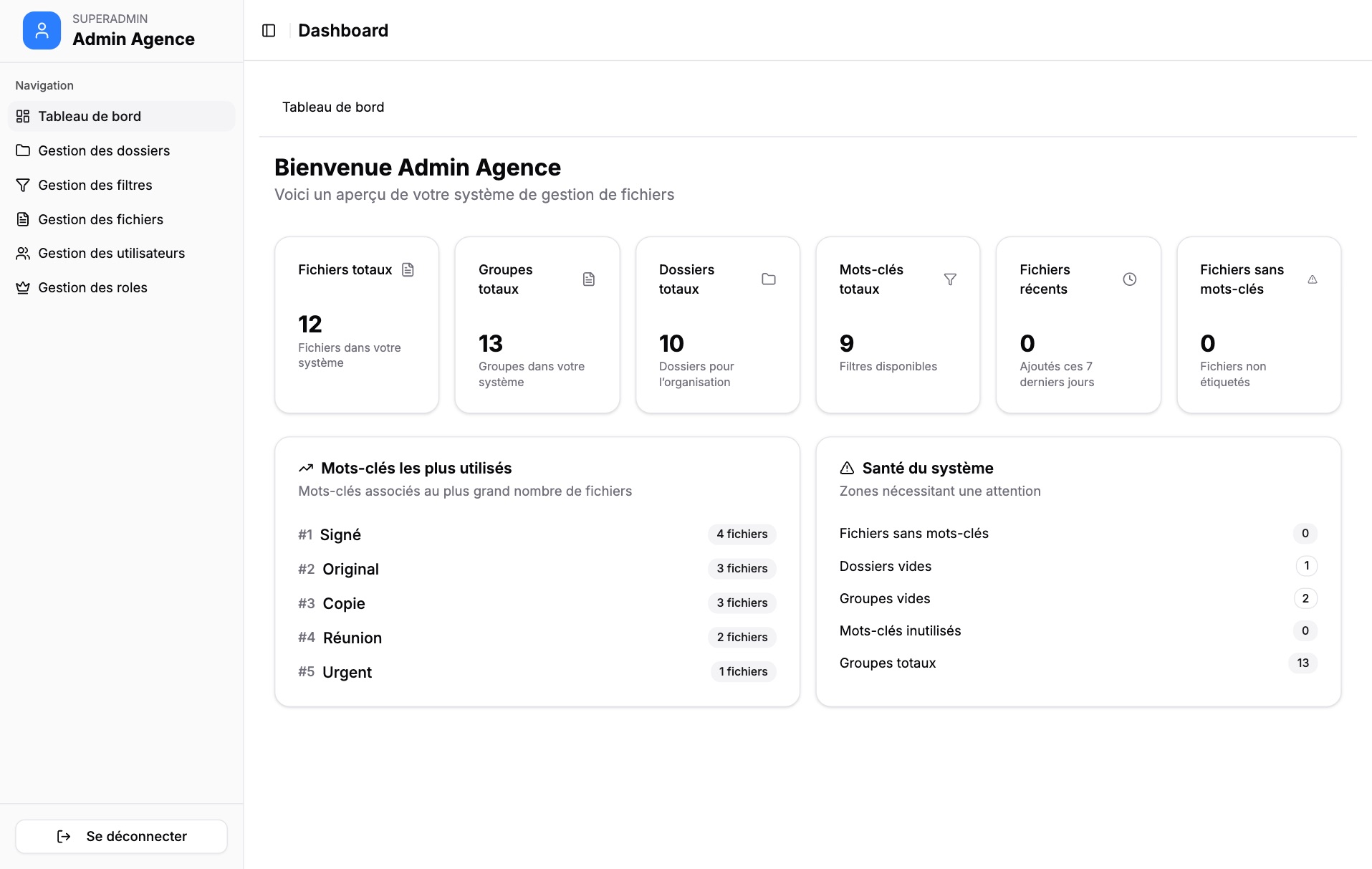
tableau de bord
Dashboard
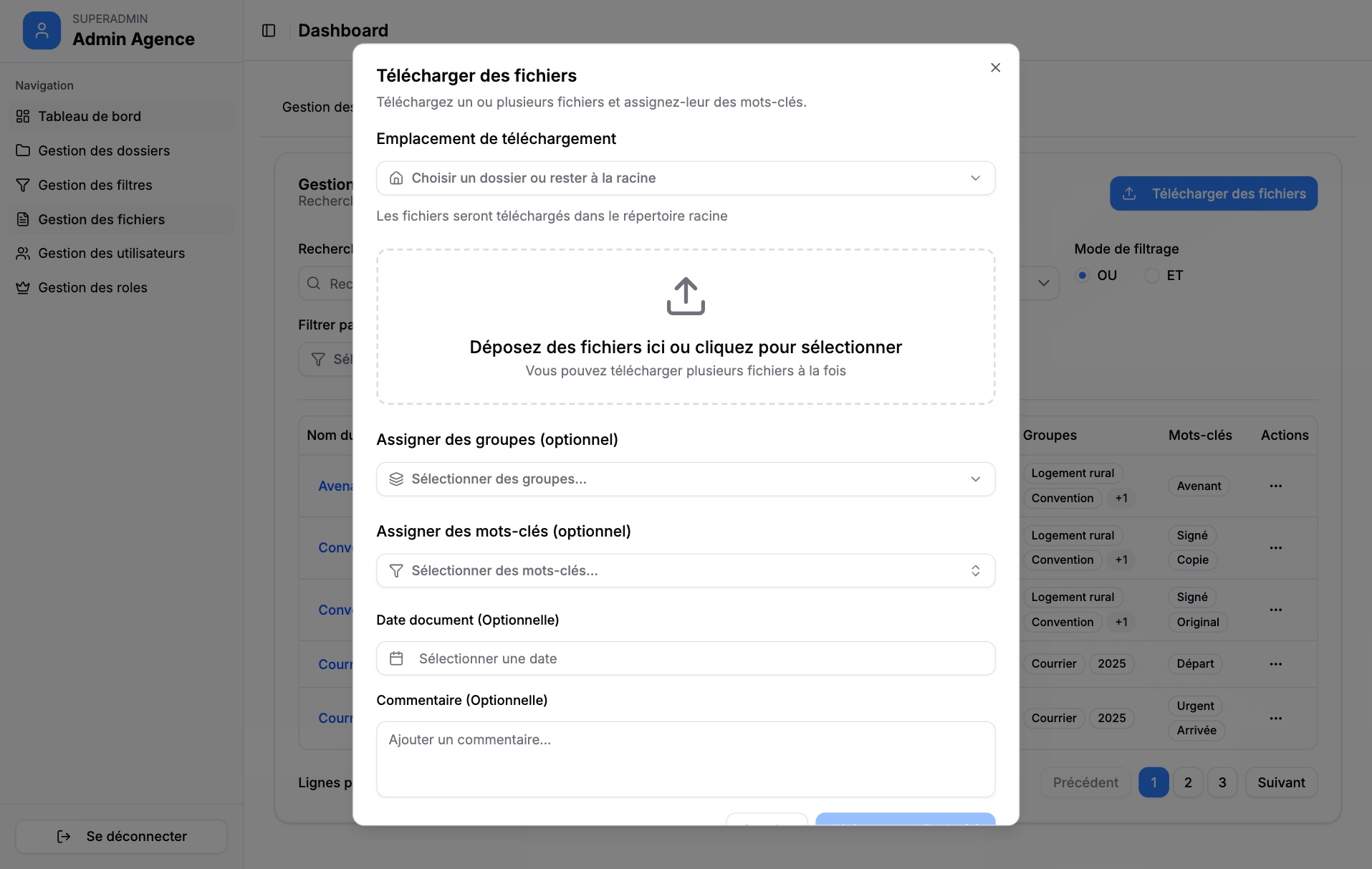
fichiers · ajouter
Adding files
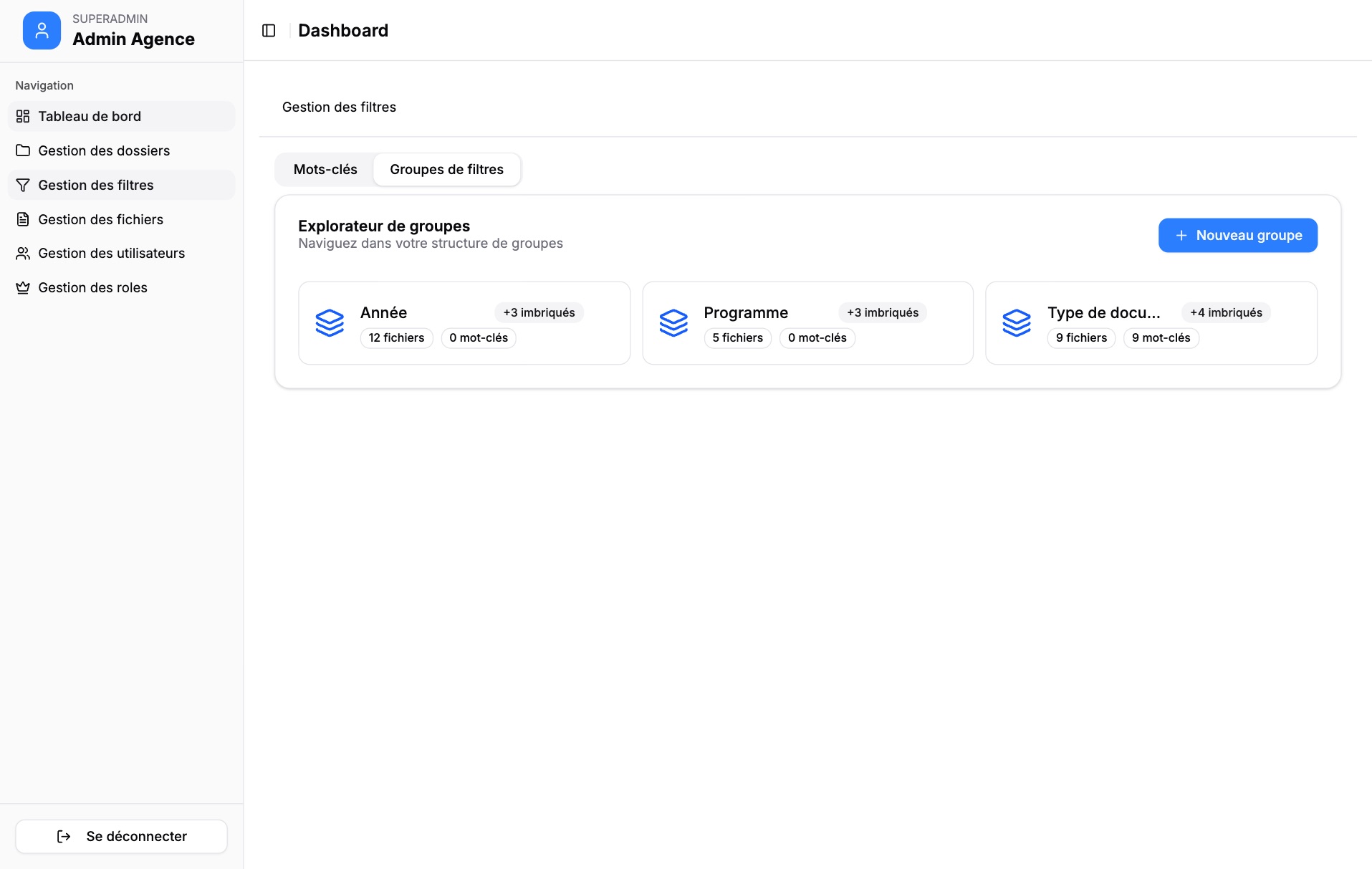
filtres
Groups of filters
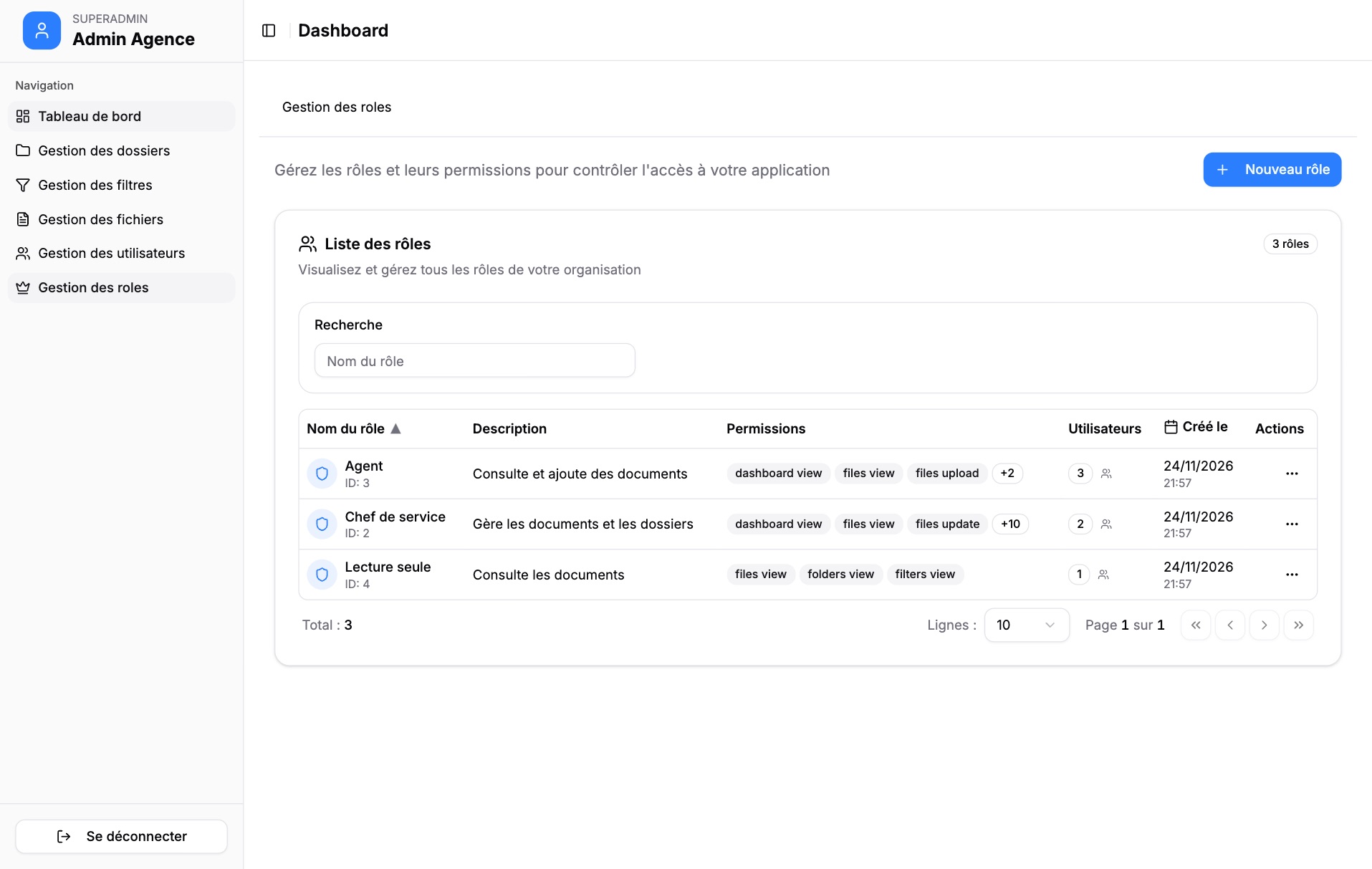
rôles
Roles
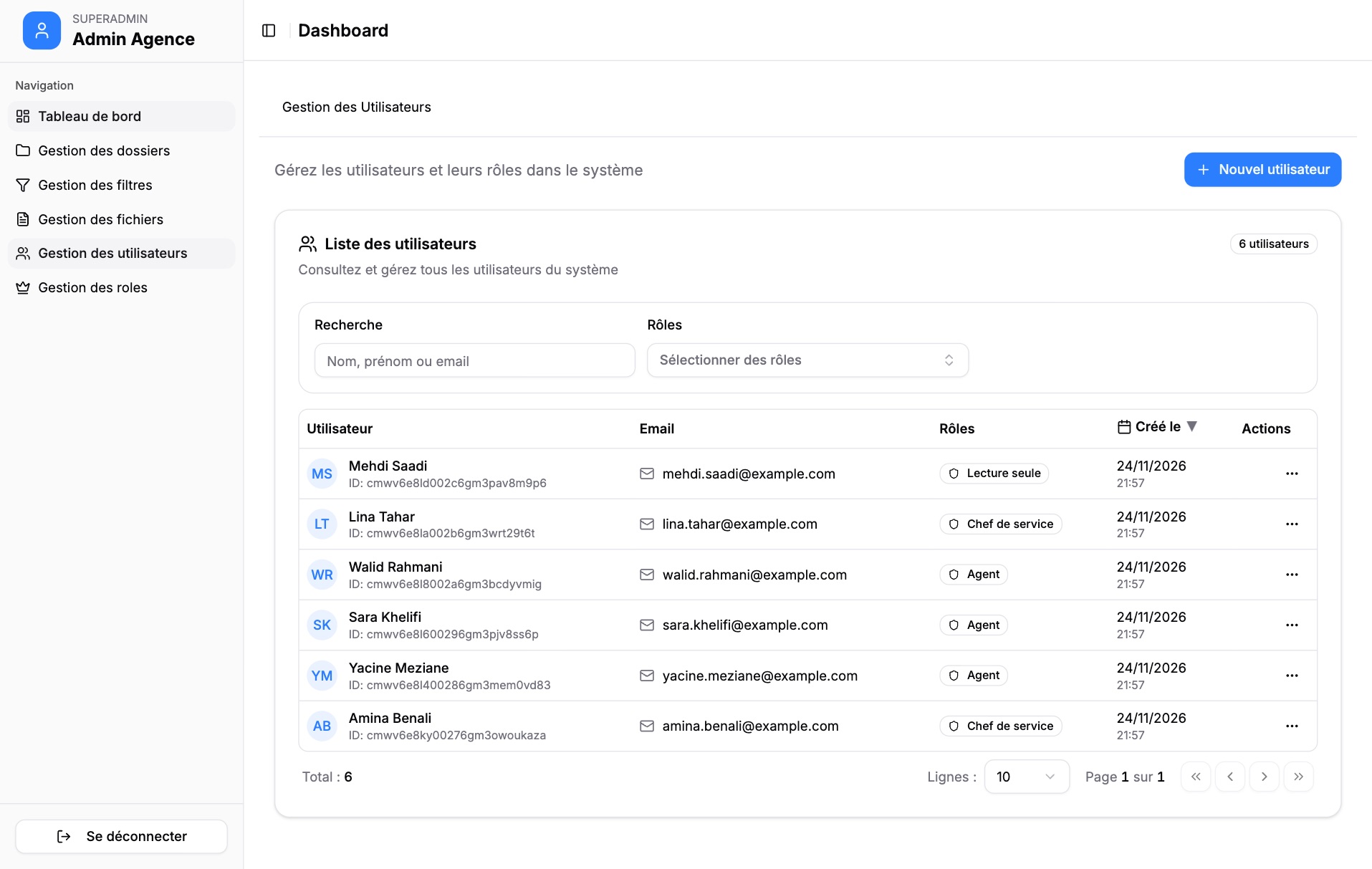
utilisateurs
Users

Real screens from the application, with sample documents and people.

The challenge

No cloud, and no administrator on site.

Documents of a public institution stay inside the institution. The system had to run on one PC in the building, start again by itself after a power cut, and be simple enough for people who are not technical.

01Find any document quickly
02The right access for each role
03Everything stays on the local network

Architecture

One PC, every computer.

Everything runs on one machine inside the branch. The numbers point to the stories below.

Windows PCinside the branchBranch computersAny web browserWeb app and APINext.jsfilesfoldersfilterskeywordsstatsUsers and rolesChecked on every requestPostgreSQLPrismaDocument filesStored on the disknetwork51243

Simplified view, based on the code.

In practice

Five problems, and how I solved them.

The problem, what I built, and what it changed.

1

Search · filters

Finding a document in more than one way

The problem
A folder gives a document one place. People remember other things: the type, the year, a keyword, the date written on the page.
What I built
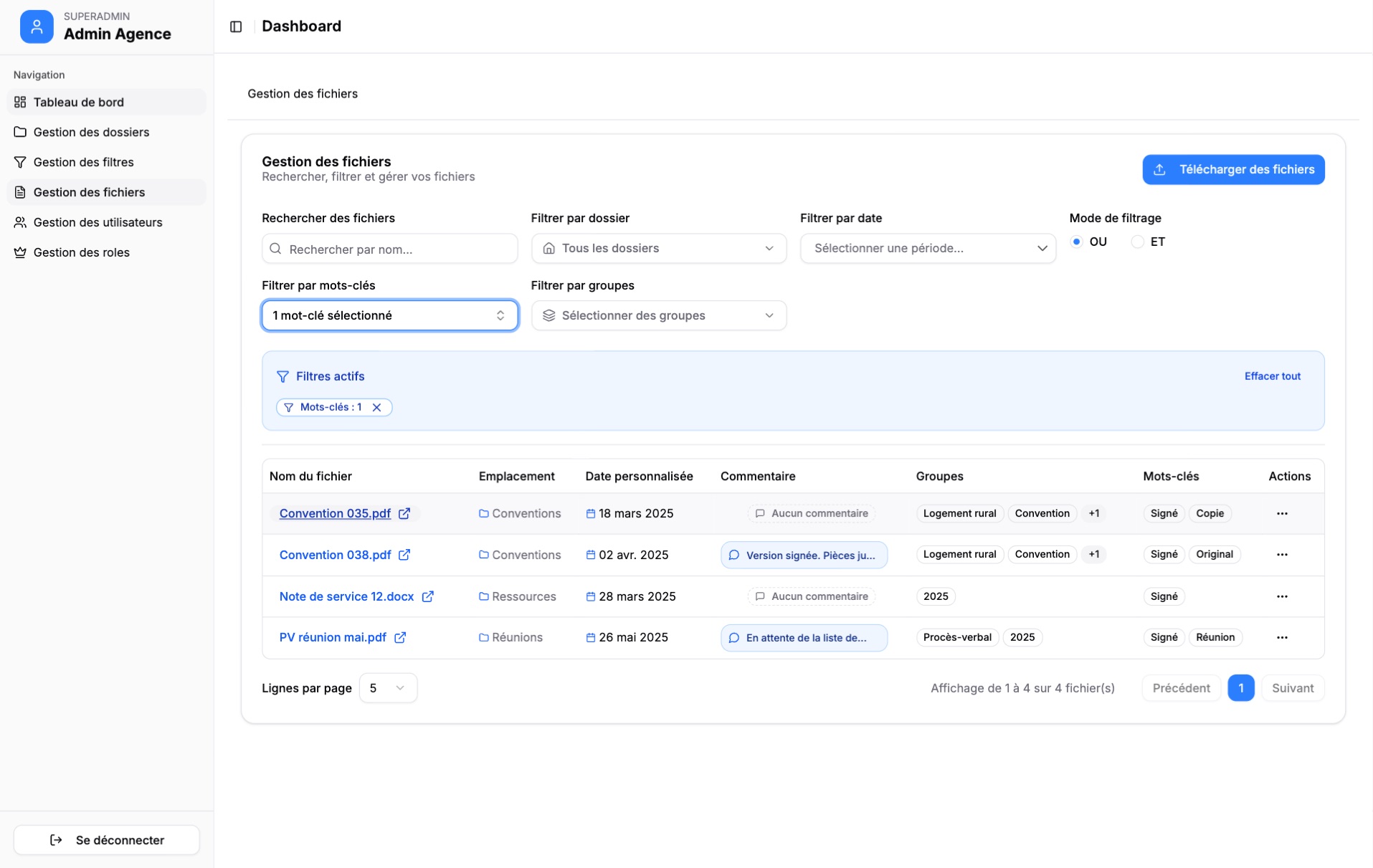
I built filters that work together: name, folder with its subfolders, document date, keywords and groups of filters that can contain other groups. The user chooses whether a document must match all of them or only one. Filters and pages are handled on the server.
What it changed
Two or three filters lead to the document, even when nobody remembers where it was filed.
  1. Keywords
  2. Folder or group
  3. Date
  4. All or any
fichiers
Documents filtered by keyword
dossiers
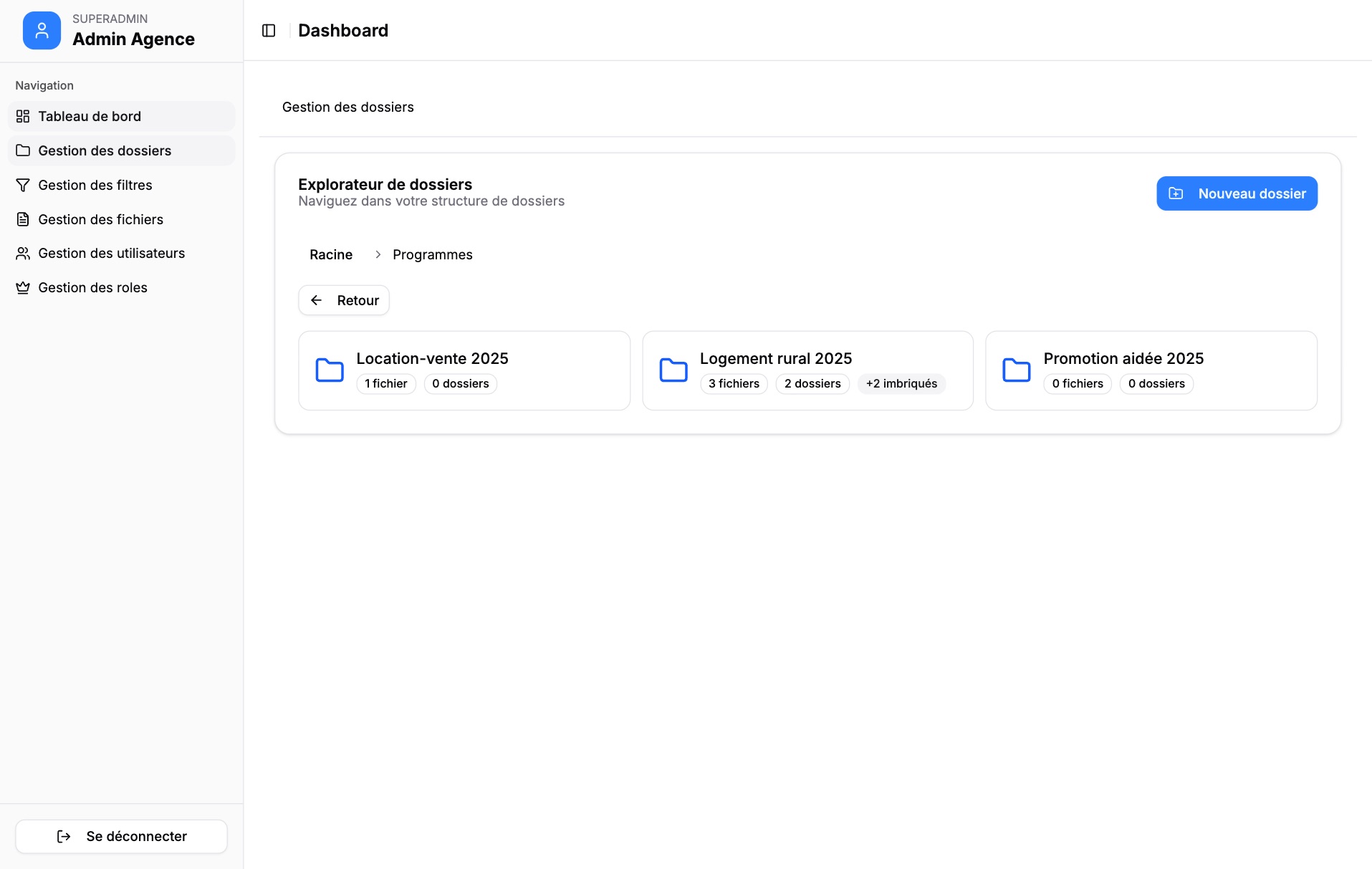
Folders and subfolders
2

Security · roles

Giving each person the right access

The problem
The first version had two kinds of users. Then the branch needed more: people who read, people who file, people who manage.
What I built
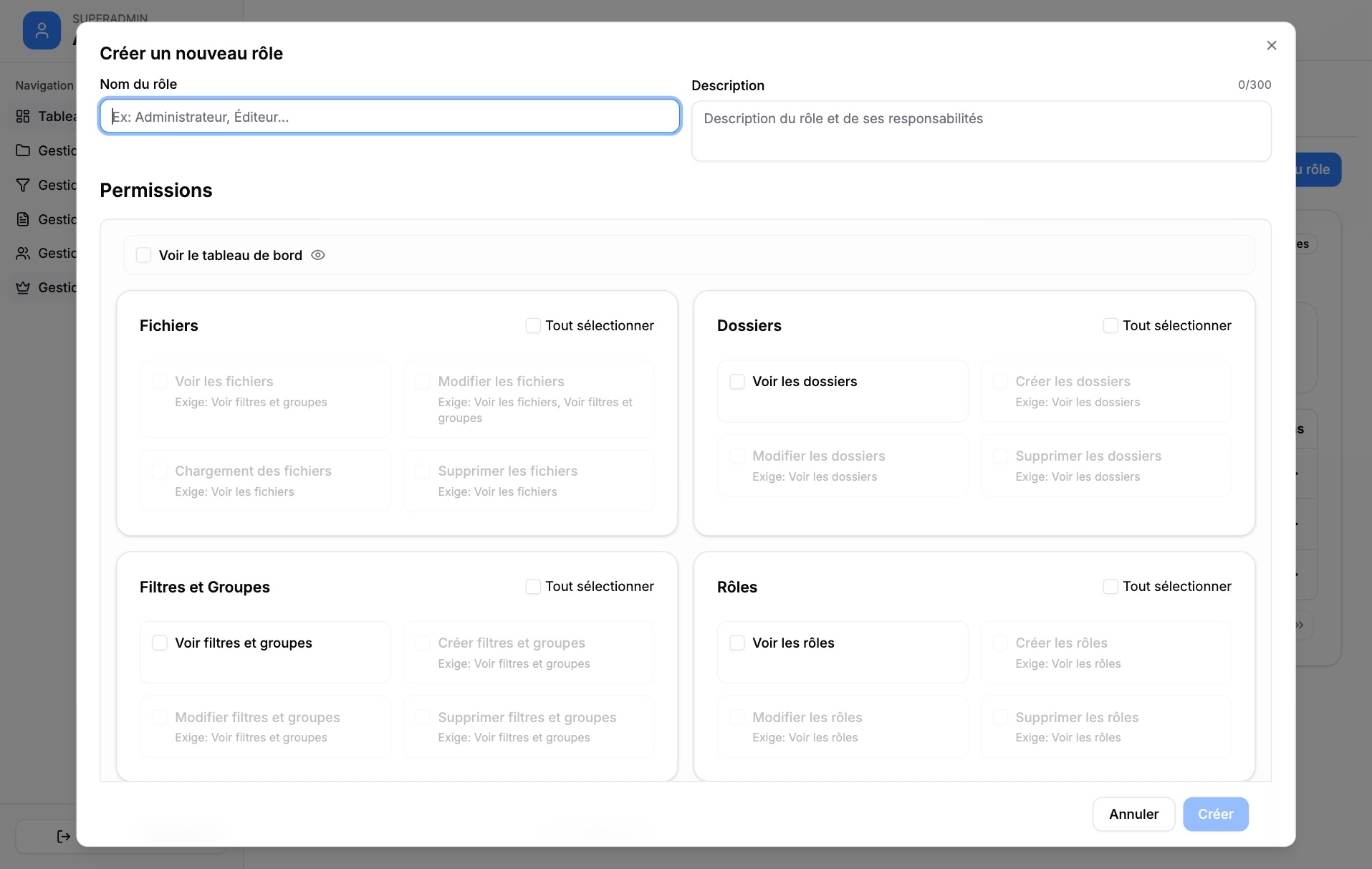
I replaced it with roles made of 25 permissions. Each request is checked on the server, and the menu shows only what the user can open. Permissions know what they depend on: the right to change a file brings the right to see it.
What it changed
The branch creates its own roles. When someone changes position, nobody calls a developer.
  1. User
  2. Role
  3. 25 permissions
  4. Checked on the server
rôles · nouveau
Creating a role with its permissions
utilisateurs
Users and their roles
3

Documents · upload

Filing it well the first time

The problem
A document that is filed badly is lost, and people file quickly.
What I built
I put everything in one window: drop the files, choose the folder, add groups and keywords, the date of the document and a comment. File names are cleaned, and two documents with the same name are refused in the same folder. PDFs and images open directly in the browser.
What it changed
The information is added while the document is still in front of the person who knows it.
  1. Drop the files
  2. Folder
  3. Keywords and date
  4. Comment
fichiers · ajouter
Adding files
4

Dashboard

Seeing what needs to be put in order

The problem
An archive gets messy slowly: files without keywords, empty folders, keywords nobody uses.
What I built
I built a dashboard that counts them, next to the totals and the most used keywords.
What it changed
The branch sees what to clean, instead of discovering it during a search.
  1. Count
  2. Show the gaps
  3. Clean
tableau de bord
Dashboard
5

Infrastructure · on-premise

Running a web app on a Windows PC

The problem
There was no hosting and no server room: a Windows PC, a local network, and nobody to type commands.
What I built
I removed what needed a technical environment, made the app listen on the whole network on the standard web port, and wrote a script that Windows runs when the session opens.
What it changed
People type an address, like for any website. If the PC restarts, the script starts the app again.
  1. Windows starts
  2. Script starts the app
  3. Local address
  4. Any computer

Everything I built

Documents

  • Upload of several files
  • Open in the browser or download
  • Document date and comment
  • Edit, move and delete

Folders and filters

  • Folders and subfolders
  • Keywords
  • Groups of filters
  • All or any, by date and name

Access

  • Login
  • Users and roles
  • 25 permissions with dependencies
  • Protected pages and API

Real screens from the application, with sample documents and people.

Timeline

In phases, with the branch.

The main steps, from the Git history.

  1. First version

    Files, folders, keywords and dates.

  2. Roles

    Permissions on every page and request.

  3. Filters

    Groups, server-side filters and pages.

  4. Installation

    Running on the branch’s PC, with a start script.

  5. Last fixes

    File names, addresses and deletion.

Outcome

What I delivered

  • A document system with folders, keywords, groups, dates and comments
  • Filters that combine, with subfolders and server-side pages
  • Users, roles and 25 permissions, checked on every request
  • A dashboard that shows what needs to be put in order
  • Installation on a Windows PC, reachable from every computer on the network
Delivered

Where it is today

Delivered to the Tizi Ouzou and Mascara branches. The last changes date from March 2026.

What I learned

When you install in the building, the setup is part of the product. The start script matters as much as the search.